The Cornell Notes System
No you dont need to bribe the admission department to get in on it...
by Scholarly
by Scholarly

I’ll be completely honest with you…
I love taking pretty notes.
I mean, that’s literally why I bought an iPad—
and not just any iPad… a Pro. With an Apple Pencil.
And of course, GoodNotes.
I was obsessed with those “study aesthetic” Pinterest boards. You know the ones.
Perfect handwriting. Color-coded everything. Highlighters working overtime.
I did this for almost my entire freshman year.
Do you know what I actually got good at?
Color theory.
Seriously—I could match colors like a designer… but ask me what I studied? No idea.
So yeah, unless you’re a fashion design student, let’s not fall into that trap.
Instead, let me introduce you to something that actually works:
the Cornell note taking system.
The Cornell system is a simple way to organize your notes so your brain actually processes what you’re writing.
You start with dividing your page into three sections:
Main Notes (right side)
Cues / Questions (left side)
Summary (bottom)
That’s it. ↓
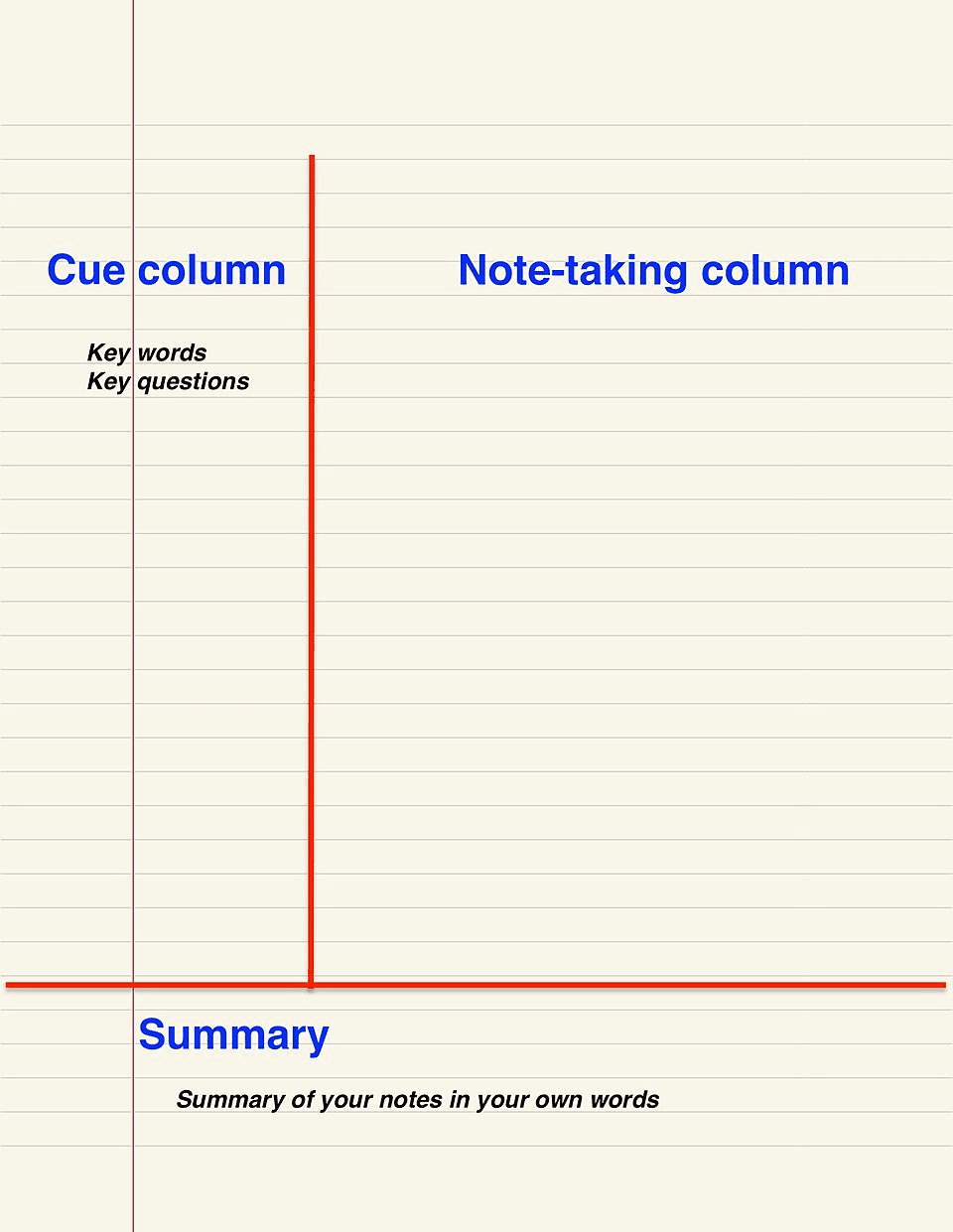
Simple structure → better thinking → better memory.
In the main section:
Write key ideas
Keep it short (no essays)
Use bullet points, diagrams, shortcuts
This is where most of your Cornell notes will go.
After you finish studying, go back and fill the left column with:
questions
keywords
triggers
For example:
“What is photosynthesis?”
“Why does this formula work?”
This is where the magic starts happening.
At the bottom, write:
a 2–3 line summary of the page
This forces your brain to:
process
simplify
understand
And not just copy.
Let’s say you’re studying biology.
Right side (notes):
Photosynthesis = process plants use to make food
Uses sunlight, water, CO₂
Produces glucose + oxygen
Left side (cues):
What is photosynthesis?
What are the inputs/outputs?
Bottom (summary):
Plants convert sunlight into energy using water and CO₂
That’s a basic Cornell notes example.
Simple. Clean. Actually useful.
The Cornell notes method is better than normal notes because:
You’re Not Just Writing, You’re Thinking
Most note-taking is passive.
But with the Cornell note taking system, you:
write
question
summarize
That’s active learning.
The left column turns your notes into a quiz.
So instead of re-reading, you can:
cover the right side
answer questions
test yourself
Which is WAY more effective.
Combine the Cornell system with spaced repetition and you’ve got:
structured notes
built-in revision
better retention
Basically a cheat code.
This is underrated.
With normal notes, you come back and think:
“What was I even trying to say here?”
With Cornell notes, everything is organized and clear.
Future you will be very grateful.
If you don’t want to draw lines every time, just use a:
Printable Cornell notes template
Digital Cornell notes format
or you can pre-draw it on your notebook before classes
It saves time and keeps things consistent.
Not everything that looks good… is good for you.
That applies to life, and yeah, your notes too.
Pretty notes might look amazing, but if they don’t help you understand or remember anything, they’re kind of useless.
Scholarly breaks your study goals into bite-sized wins so you actually understand what you learn; not just memorize it!
Free for students. No credit card needed!!!